
This quarter, we shipped a batch of updates driven largely by feedback from the brands and freelancers who use nDash regularly. Here’s a quick look at what’s new:
| Brand Facing | Talent Facing | |
| Expanded language options for freelancer profiles | ✅ | ✅ |
| Status filters on the Assignment Overview page | ✅ | ❌ |
| Custom billing email and invoice footer | ✅ | ❌ |
| Public, shareable URLs for assignments and talent requests | ✅ | ✅ |
| Vacation Mode for freelancers | ✅ | ✅ |
| Sort by Brand on writer dashboards | ❌ | ✅ |
| Access to past applicants on filled assignments and talent requests | ✅ | ❌ |
| Add a “Watcher” to assignments | ✅ | ❌ |
| Clone completed assignments | ✅ | ❌ |
| Reassign assignment ownership from the overview screen | ✅ | ❌ |
| Plus, ongoing bug fixes and security updates | ✅ | ✅ |
1. Expanded language options for freelancer profiles
Per freelancer and brand requests, nDash expanded the list of languages freelancers can select on their profile to include:
- Italian
- Chinese
- Swedish
- Tagalog
- Vietnamese
- Korean
This update helps brands running localization and translation projects find and match with freelancers who have the right language expertise, rather than relying on generic profile searches or guesswork.
Thanks to Anne Papmehl for the suggestion!
2. Status filters on the Assignment Overview page
We added filters on the assignment overview page to help both brands and freelancers organize their assignments, including the ability to filter by status such as “In Progress” and “Past Due.” This came directly out of freelancer feedback, and reflects nDash’s ongoing focus on helping freelancers work more efficiently and stay on top of deadlines.
3. Custom billing email and invoice footer
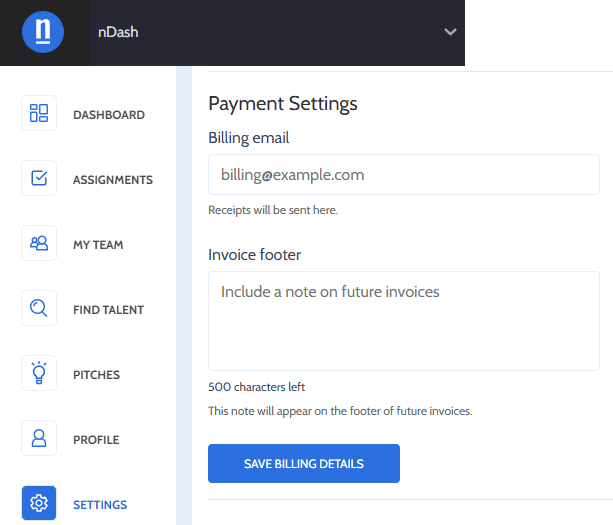
Now, brands can see a billing email field directly within their payment settings, giving them control over where invoices and receipts are sent. This feature comes in handy when redirecting billing after a team member leaves or when routing invoices straight to finance. We’ve also added an invoice footer field, allowing brands to include a note that’s saved and applied to all future invoices by default.
Note: This applies to brands paying via credit card only, and does not apply to those paying via invoice or ACH.
4. Public, shareable URLs for assignments and talent requests
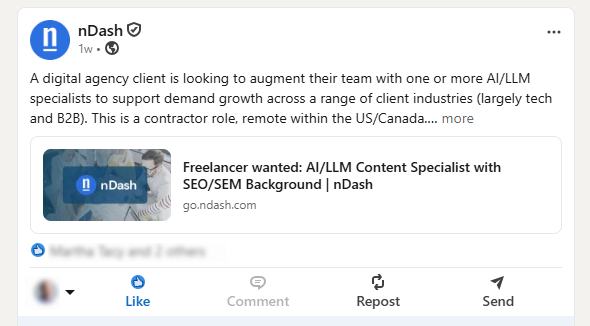
Brands can now generate a public URL for a new assignment or talent request, similar to freelancer public profile pages, making it easy to share open opportunities on LinkedIn and other social channels. Pages are SEO indexable and render properly when shared on LinkedIn. Logged-out visitors see a trimmed view (no brand name, logo, or price) with a “Sign Up” prompt instead of “Create Offer.” That way, qualified talent can join nDash to apply.
Once an assignment is closed or filled, the link no longer resolves. This supports nDash’s broader goal of building a community of the best available talent, helping brands attract, find, and match with the right freelancers, even for niche or highly specialized roles.
5. Vacation Mode for freelancers
Freelancers can now turn on Vacation Mode from their account settings, which displays a persistent reminder in their own nav (“Vacation mode is on”) and adds a “Zzz” icon next to their name on their profile and in brand-side search results, letting brands know they may be out of office. Brands can still fully interact with the freelancer; the icon is simply a heads-up.
This was a frequently requested feature, including a mention in a 5-star Capterra review asking for a way to signal availability status. For brands, this makes it easier to see at a glance who’s available to take on additional projects, rather than reaching out and waiting to hear back.
Thanks to Jack Pittas, Aimee Pearcy, and Jess Shanahan for the idea!
6. Sort by Brand on writer dashboards
Writers can now sort their assignment list alphabetically (A-Z) by brand name, making it easier to organize and find assignments when working across multiple brands.
Thanks to Amy Hooker Kidd for the idea!
7. Access to past applicants on filled assignments and talent requests
Previously, once a brand selected a freelancer for an assignment or talent request, the other applicants (and the experience, samples, and rates they submitted) were no longer accessible. Now, nDash saves that full applicant list. A new “More Applicants” option under an assignment’s “More Options” menu lets brands revisit it later, useful if they want to restart the process with a different applicant, or reference past submissions when a similar need comes up again. This also raises the value of a strong application. Since a freelancer’s pitch, samples, and rate are preserved rather than disappearing once a role is filled, taking the time to submit a thoughtful, detailed application can pay off well beyond the assignment it was submitted for.
8. Add a “Watcher” to assignments
Brands can now add a “watcher” to an assignment, both when creating it and on those that are already open. This feature provides an additional teammate with visibility into the assignment and its message thread without making them the owner. Watchers receive email updates and communication tied to the assignment, so managers or colleagues can stay in the loop without taking ownership.
9. Clone completed assignments
It’s now possible for brands to clone a completed assignment, not just those that are in-progress. The button previously labeled “Hire This Freelancer Again” has been trimmed to “Hire Again,” and a new “Clone Assignment” button sits alongside it, matching the pattern already used for in-progress assignments.
10. Reassign assignment ownership from the overview screen
When clicking on an assignment’s owner profile photo directly within the assignment overview screen, brands can now reassign ownership. After clicking the photo, an “Assign To” module will pull up, allowing them to reassign ownership to another teammate without needing to open the assignment itself. This feature is great for workflows where responsibility shifts between team members, like handing off from an editor to a SME, or when moving between a project’s design and CRM stages.
Plus, ongoing bug fixes and security updates
Alongside these features, our team shipped a steady stream of bug fixes, UI polish, and infrastructure and security hardening this quarter. As always, we don’t publish specifics on security-related work, but keeping the platform stable, fast, and secure remains a constant priority behind the scenes.
Have feedback or a feature request of your own? We build a lot of what you see here directly from freelancer and brand input, so keep it coming.