
Welcome to the first edition of nDash Release Notes, a new series where we share platform updates as they launch. This edition covers everything we’ve shipped since our Q3 2026 product update: a free Pro plan, one-click Google sign-in, a Verified nDash Account badge, smarter assignment search, and a handful of improvements that save brands and freelancers a few clicks every day.
We’ll keep publishing Release Notes as new features go live, and roll everything up in our quarterly product post.
Here’s a quick look at what’s new:
| Brand Facing | Talent Facing | |
|---|---|---|
| nDash Pro is now free | ✅ | ❌ |
| Sign up and sign in with Google | ✅ | ✅ |
| Verified nDash Account badge | ✅ | ✅ |
| Search assignments by freelancer name | ✅ | ❌ |
| Search assignments by brand and type | ❌ | ✅ |
| Comments open by default | ✅ | ✅ |
| Time stamps on file uploads | ✅ | ✅ |
| Share button on freelancer profiles | ✅ | ❌ |
| A cleaner look across the app | ✅ | ✅ |
| Plus, ongoing bug fixes and security updates | ✅ | ✅ |
1. nDash Pro is now free
Getting started on nDash no longer requires a subscription. Pro is now free: add a payment method, and you’re only charged when you approve completed work. Pro includes hands-on account setup, talent sourcing and vetting, unlimited users, and all platform features.
Want more? An optional $300/year add-on unlocks lower platform fees, longer approval windows, off-network recruiting, priority talent matching, and consolidated monthly invoicing. Compare every option on our pricing page.
2. Sign up and sign in with Google
You can now create an nDash account or sign in with your Google account in one click, whether you’re a brand or a freelancer. Brands will see one quick extra step after connecting Google to add their company name and website. Already have an nDash account under a Google email address? Just click “Sign in with Google,” and you’ll land in your existing account. Prefer email? That option works exactly as before.
We’ve also strengthened password requirements. New passwords now need at least 15 characters, in line with the latest NIST digital identity guidelines.
3. Verified nDash Account badge
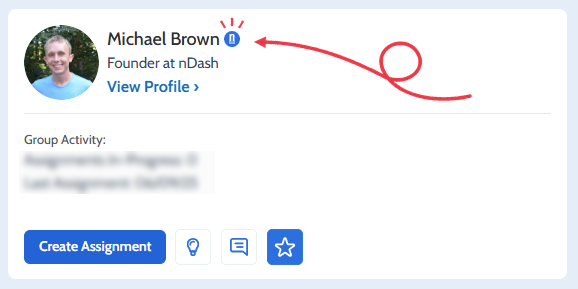
You’ll now see a blue nDash badge next to the names of nDash team members across the platform. Hover over it, and you’ll see “Verified nDash Account.” The badge appears only on accounts with a verified nDash email address, so brands and freelancers can always tell when they’re working with a real member of the nDash team, whether that’s a project manager on your account or our support staff.
We haven’t seen any impersonation issues on nDash; this is a proactive step to keep it that way. If someone ever claims to be from nDash without the badge, let us know before sharing any details.
4. Search assignments by freelancer name
The keyword search on the Assignments page now looks beyond assignment titles. Search for a freelancer’s name, and you’ll see every assignment they’re working on or have completed, along with any assignments that mention them in the title. It’s a faster way to pull up a freelancer’s full history with your team, whether you’re reviewing past work, checking spend, or lining up the next project.
5. Search assignments by brand and type
Freelancers can now search their assignment list by brand name and assignment type, not just by title. Type a client’s name to see every assignment you’ve done for them, or search “Design” or “Strategy” to pull up all work of that type. It’s especially useful for freelancers juggling multiple brands and service lines.
6. Comments open by default
When you click Reply in an nDash message notification, you’ll now land on the assignment page with the comments thread already open. Previously, the Comments tab was collapsed, so you had to click again to see the conversation you were replying to. It’s one less step for brands and freelancers keeping projects moving from their inbox.
7. Time stamps on file uploads
Files uploaded to an assignment now show the time they were added, not just the date. When a freelancer shares several drafts or design options on the same day, everyone can see at a glance which version is the latest, making rounds of revisions easier to follow.
8. Share button on freelancer profiles
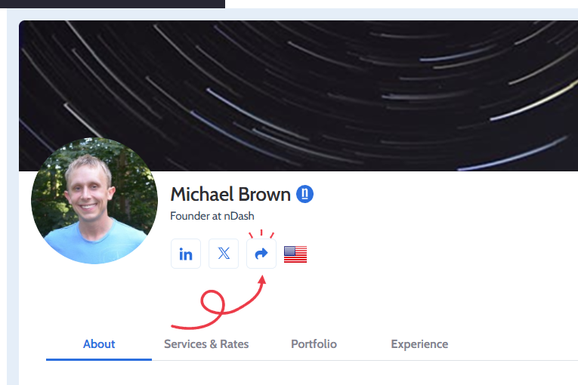
Brands can now share any freelancer’s public profile in one click. A new share icon next to the freelancer’s social links copies their public profile URL to your clipboard, ready to paste into an email, Slack message, or LinkedIn post. The button appears for logged-in brands and for visitors who aren’t logged in, so anyone who lands on a profile can pass it along to a colleague or hiring manager.
Freelancers: you can already share your own profile using the “Share Your Profile” button, and when a brand signs up through your link, you earn a percentage of their spend through the nDash referral program.
9. A cleaner look across the app
We’ve refreshed text and buttons throughout nDash. Headings and body text use the Cabin font with cleaner sizing and spacing, and buttons are now easier to read and use: no more all caps, consistent sizes, rounded corners, and clear hover and keyboard focus states.
Bug fixes
Ongoing general bug fixes, including a minor issue with assignment watchers that kept brand users from seeing who was watching an assignment or removing themselves as a watcher.
Have a feature request?
Many of our updates start with feedback from the brands and freelancers who use nDash every day. If there’s something that would make your work easier, let us know.
Missed our last round of updates? Catch up on everything we shipped in What’s New on nDash: Q3 2026 Product Updates.